Cyclists do not buy a flagship head unit because the spec sheet looks pretty. They buy it because the wrong turn, washed-out screen, dead battery, or missed climb warning can spoil a ride that took all week to plan. That is why the Garmin Edge 1050 lands with more weight than another shiny handlebar gadget: it tries to make the map easier to trust while you are moving, sweating, and dealing with traffic.
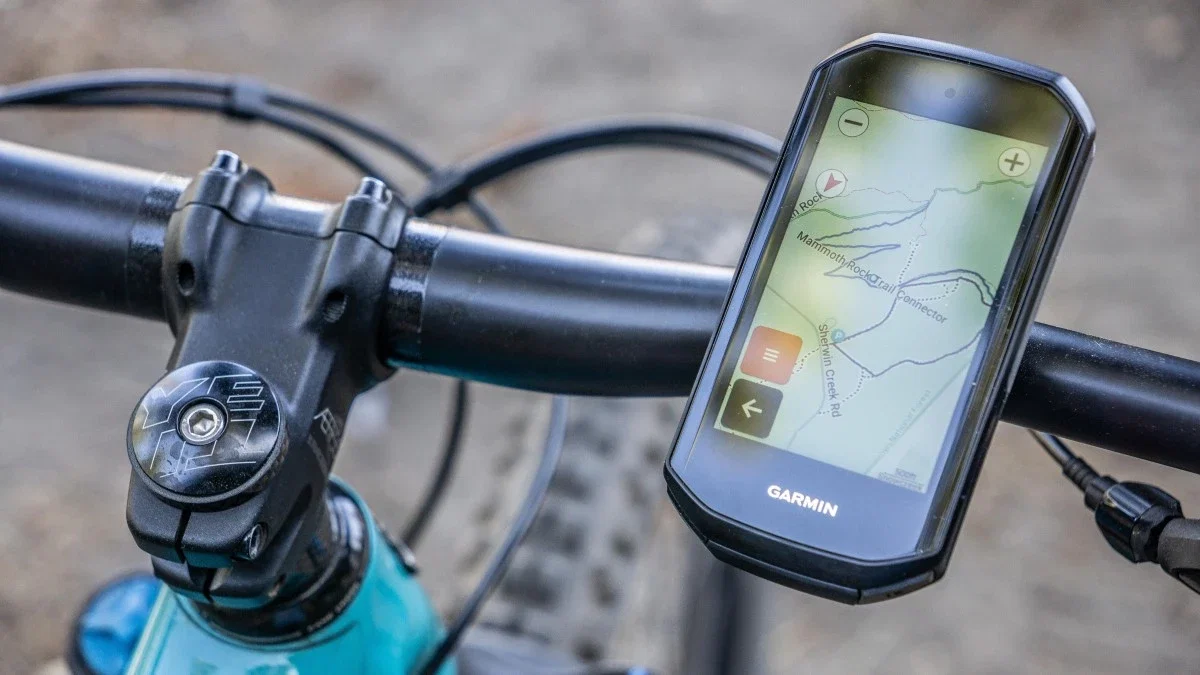
Garmin’s own product page centers the device on a vivid color touchscreen, detailed maps and stats, road hazard alerts, group ride tools, speaker prompts, and battery claims of up to 20 hours in demanding use or 60 hours in saver mode. For American riders comparing launch news, restock chatter, and gear coverage through consumer tech updates, the real question is not whether this cycling computer has more features. The better question is whether the upgraded mapping features solve problems you feel on U.S. roads, trails, bike lanes, and unfamiliar event routes.
Why Garmin Edge 1050 Mapping Feels Built for Real Roads
A map on a bike is not the same as a map in a car. A driver can glance at a dashboard, sit behind glass, and let lane markings do half the work. A rider has wind noise, road buzz, sweat, sun glare, traffic, and often a route that ducks through neighborhood cut-throughs or gravel connectors. That is where this device tries to earn its price, because a route line has to stay readable when your hands are tired and your front wheel is bouncing. Garmin’s sharper screen is the headline, but the quieter win is how fast a rider can read the map under stress. If you are descending toward a fork in western North Carolina, or trying to spot a turn near a busy Phoenix canal path, the map has to speak fast. Bigger color contrast, cleaner road detail, and better surface cues help when your eyes have only a second.
Why screen clarity changes route confidence
The screen is not decoration here. Reviewers who tested the unit after launch kept coming back to the brighter, higher-resolution display, with DC Rainmaker describing a 1,000-nit screen and a much more phone-like response than older Edge units. That matters because bike navigation fails less often from missing data than from slow human reading.
A rider can know the route and still miss it. Maybe the sun hits the screen at noon on a Texas farm road. Maybe the map line blends into city clutter near Chicago’s lakefront. Maybe a rider is wearing tinted glasses and trying not to drift into a pothole. A clearer display gives your brain less to decode.
That small advantage grows during longer rides. After four hours, your map skills do not vanish, but your patience shrinks. A turn that looked simple at mile 12 can feel strangely vague at mile 82. A better screen does not make you stronger, yet it can protect the decision-making you have left. The non-obvious part is that clarity can make you ride calmer. You brake less often for “Wait, is that my turn?” moments. You stop less to pinch-zoom your phone. You spend more attention on wheels, cars, dogs, gravel, and the rider ahead of you.
Where bike navigation still needs rider judgment
No device knows every mood of the road. Construction barrels move. Park gates close. A “quiet” road can feel hostile when commuters are late. Upgraded bike navigation should help you decide faster, not decide everything for you.
That is why the hazard-reporting idea is both useful and limited. Garmin promotes road hazard alerts reported by other cyclists, and outside reviewers have noted the feature for potholes, dangerous junctions, and roadworks. On a club ride outside Denver, that could warn a pack before a torn-up shoulder. On a familiar commute, it may become noise if the same old pothole shows up every morning.
The sharpest riders treat the map as one voice in the room. They also read tire tracks, road paint, parked cars, shadows, wind direction, and how drivers behave at the next intersection. That old-school skill still matters. A premium head unit should support it, not replace it. The best use is selective trust. Let the unit warn you, then judge the road with your eyes. Good mapping reduces surprises. It does not remove responsibility.
The Launch Story Is About Usability, Not Spec Bragging
The device launched in June 2024, but the story has aged in a useful way. Early coverage focused on the screen, speaker, bell, new group tools, and battery drop versus some older models. By 2026, long-term reviews were more honest: the screen still stands out, the processor feels fast, Wi-Fi map management is useful, and the battery tradeoff depends on what kind of cyclist you are. That time gap helps buyers because launch hype tends to flatten everything into “new equals better.” Two years of riding tells a harder truth: a brighter display can be worth more than a longer battery for one rider and the wrong trade for another.
Why a faster interface matters mid-ride
Speed sounds boring until you need it. A head unit that lags at the kitchen table is annoying. A head unit that lags while rerouting after a wrong turn can change the whole feel of a ride.
Think about a rider leaving a charity century in central Florida. The course is marked, but rain has knocked one sign sideways. The group rolls past the turn, phones are zipped in jersey pockets, and nobody wants to stop. A faster device that pans, redraws, and reacts without drama saves the group from five minutes of roadside debate.
That moment is not about impatience. It is about rhythm. Once a group stops, bottles come out, legs cool, and the ride turns into committee work. A better interface keeps the route conversation small enough that the ride stays a ride. That is the kind of upgrade riders remember. Not because it wins an argument on a spec sheet. Because it keeps the ride moving.
Why the speaker and bell are more practical than they sound
A built-in speaker can sound like a gimmick before you ride with one. Then a turn prompt arrives before a blind corner, or the on-device bell helps you pass walkers on a mixed-use path without shouting. Garmin lists spoken workout and navigation prompts, plus an on-device bike bell, among the device’s features.
The counterintuitive bit is that audio can make you look at the screen less. A fancy display gets attention, but the safer move is often to glance less and listen more. On a crowded path in Austin or Minneapolis, that small shift can matter.
Bell tone also changes the social feel of a pass. A yelled “on your left” can sound irritated even when you mean well. A clean alert from the bars can feel less personal, which helps around families, runners, and dog walkers. Small manners matter when cyclists share narrow public space. There is a social limit, though. Nobody wants a head unit talking through every group ride. The smart setup is personal: louder for solo rides, toned down for pacelines, and reserved for turns that matter.
How It Fits American Riding Habits
The U.S. is not one cycling market. A rider in Vermont may care about dirt connectors and steep rollers. A rider in Los Angeles may care about traffic stress and long climbs. A rider in Kansas may stare down sun, wind, and endless open roads where missing one turn can add miles. One device has to serve all of that without becoming a tiny laptop on the bars. That is the hard job for any premium cycling computer. More features are easy to advertise. Better ride fit is harder. The Edge 1050 makes the most sense when its mapping and training tools match the way you ride most weeks, not the fantasy version of your riding.
Road, gravel, and event riders want different answers
For road riders, the value sits in fast rerouting, readable junctions, climb pacing, and radar pairing. A weekend group ride in suburban Atlanta may cover smooth roads, awkward intersections, and sudden traffic gaps. Clear prompts and better map contrast help you react without turning the ride into a screen-checking contest.
For gravel riders, surface awareness matters more. Garmin’s marketing in some regions highlights road surface type on the map, and reviewers have called out improved map backgrounds and Wi-Fi map downloading as useful for travel. If you are heading to an event like Unbound-style gravel, the small details matter: where the road bends, where resupply sits, and how much climb is still waiting.
Event riders sit between those two worlds. They may know the distance but not the roads. They need confidence more than novelty. That is where cycling gear buying guides can help readers compare the device to smaller or cheaper options before spending flagship money. Travel riders get another benefit: fewer laptop chores. A Wi-Fi map manager sounds dull until you land in another state, build a route at night, and realize the maps need attention. At that point, easy map handling feels less like a feature and more like mercy.
Why battery life is a real trade, not a deal breaker
Battery life is the easiest complaint and the easiest claim to misunderstand. Garmin states up to 20 hours in demanding use and up to 60 hours in battery saver mode. That is plenty for many U.S. riders who do two-hour weekday rides, Saturday fondos, gravel races, and travel routes.
Yet it is not the same comfort as older long-life units. If you ride through the night, tour for days, or hate charging gear, you will think about power more than you want to. That is not a tiny issue. It changes packing, charging habits, and route planning.
The practical answer is to build a charging habit around the ride you do most often. Plug it in after long weekends. Lower brightness when the route is familiar. Carry a small power bank for events that run into the dark. None of that is glamorous, but neither is sitting at mile 118 with a blank screen. The non-obvious answer is that shorter battery life may still feel better for daily riding. A clear map you can read every minute may beat a dimmer unit that lasts longer than you need. Range matters most when you use it. The rest of the time, readability wins.
Buying Logic Before the Upgrade Temptation Takes Over
Premium gear has a way of turning careful adults into excuse machines. You start with “I need better routes,” then somehow you are comparing mounts, sensors, radar, power meters, and wallet backup features. The right move is slower. Decide what pain you are trying to remove. This is where the Edge 1050 is both easy and hard to recommend. It is easy because the screen, mapping, speaker prompts, and Garmin ecosystem make daily riding feel polished. It is hard because cheaper devices can still record rides, follow routes, and pair with sensors. The upgrade only makes sense when the experience gap matters to you. The better shopping question is plain: which mistake do you want the device to prevent? A missed turn, a dead phone, a messy group ride, a bad climb effort, or a route that feels uncertain can each justify different spending.
Who should pay for the flagship experience
Buy it if maps are central to your riding. That includes riders who travel with bikes, lead group rides, race events on unknown roads, or pair a head unit with radar, power, and structured workouts. In that world, the device is not a luxury screen. It is the command center for the ride.
The best bike computer comparison a buyer can make should start with honest habits. Do you explore new routes every month? Do you follow courses from Strava, Ride with GPS, or local clubs? Do you ride in areas where missing one turn means a dangerous shoulder or a long climb back?
Garmin’s wider ecosystem can also shift the math. If you already use a Garmin watch, radar, heart-rate strap, power meter, and Connect training tools, the head unit becomes part of a larger record of your fitness. That can matter for riders who want recovery, training load, route history, and ride data in one place. If the answer is yes, the flagship case gets stronger. If you ride the same park loop three times a week, it gets weaker. No shame there. Great gear should match the road, not your ego. Start with the official Edge product page for specs, then compare real store pricing before you buy.
Who should wait, downsize, or choose another path
Some riders should skip it. Weight-focused racers may dislike the larger body. Budget riders may get most of what they need from a lower-priced GPS bike computer. Ultra-distance cyclists may want longer battery comfort more than screen brightness. That is a valid call.
There is also the phone question. A smartphone is fine for casual route checks, but it is not a clean substitute for hard riding. Heat, rain, battery drain, gloves, mounts, crashes, and app interruptions all get old fast. Still, if you only need occasional directions, a dedicated unit may be more machine than you need.
A smaller unit may make sense for riders who want the Garmin feel without the flagship footprint. A rival may make sense if you care more about battery life, price, or a different app setup. The best choice is not always the most expensive one; it is the one you will trust after three months, not three minutes. A smarter purchase path is simple: rent, borrow, or test a similar large-screen unit before buying. Look at it in sunlight. Try it with gloves. Pan a map while breathing hard. The right answer appears faster on a real ride than in a shopping cart.
Conclusion
The launch lesson is not that every cyclist needs the most expensive head unit on the shelf. Most do not. The better lesson is that mapping has become the heart of premium ride tech, not a side feature tucked behind speed, distance, and calories.
The Garmin Edge 1050 makes its strongest case when you care about route confidence, readable detail, spoken prompts, group tools, and a screen that holds up when the ride gets messy. It also asks you to accept the battery trade and the price. That is fair. High-end gear should be judged by the problems it removes, not the number of features it collects.
For U.S. riders, the smart move is to match the device to the roads you ride most: city bike lanes, mountain passes, gravel grids, event courses, or solo weekend loops. If better bike navigation changes how safely and calmly you ride, this upgrade deserves a serious look. Buy the tool that makes the ride better, not the one that only looks good online.
Frequently Asked Questions
How much does this Edge model cost in the United States?
The listed U.S. price has commonly sat around the flagship range, with reviews noting a $699.99 price point. Retail promos can change that, so check Garmin, major bike shops, and trusted outdoor retailers before buying.
Is this cycling computer worth it for casual riders?
It is usually more than casual riders need. If you ride familiar routes and only track distance, a lower-cost GPS bike computer can work well. The flagship value appears when maps, training data, radar, and route planning matter often.
What are the upgraded mapping features good for?
They help with faster visual reading, clearer route lines, better surface context, easier map handling, and more confident turns. The biggest gain is not novelty. It is reducing confusion when you are tired, moving fast, or riding unfamiliar roads.
Can this device replace a smartphone for bike navigation?
It can replace a phone for most ride navigation tasks, but not for every travel need. A phone is still better for texting, emergency calls, lodging searches, and broad trip planning. On the bike, a dedicated head unit is cleaner and safer.
How long does the battery last on long rides?
Garmin lists up to 20 hours in demanding use and up to 60 hours in battery saver mode. Real use depends on brightness, sensors, navigation, speaker prompts, temperature, and how often you interact with the map.
Does the speaker make a difference while riding?
Yes, especially for solo routes and turn prompts. It can reduce screen checking and make alerts easier to notice. In group rides, keep prompts controlled so the device does not annoy riders around you.
Is it good for gravel riding in the USA?
It can be a strong gravel option if you value readable maps, route detail, hazard awareness, and sensor pairing. For remote all-day events, think carefully about charging plans and battery settings before race morning.
What should I compare before buying?
Compare screen readability, battery life, routing style, mount fit, sensor support, app ecosystem, and price. Also compare how often you ride unknown routes. That habit decides whether a premium head unit feels useful or excessive.